Download edition
$25 USD
Download Step Aside OS and make your own start-up USB drive.
- The complete operating system
- Individual keys for the included proprietary tools
- You supply a USB drive of 16 GB or more
 STEP ASIDE OS
Experimental desktop · practical tools
Step Aside OS is a complete desktop operating system for people leaving Windows, with its own practical tools built in. Start it from a USB drive, try it, and install it when you are ready.
Step Aside OS is not on sale yet. This page shows the current version and the planned offer.
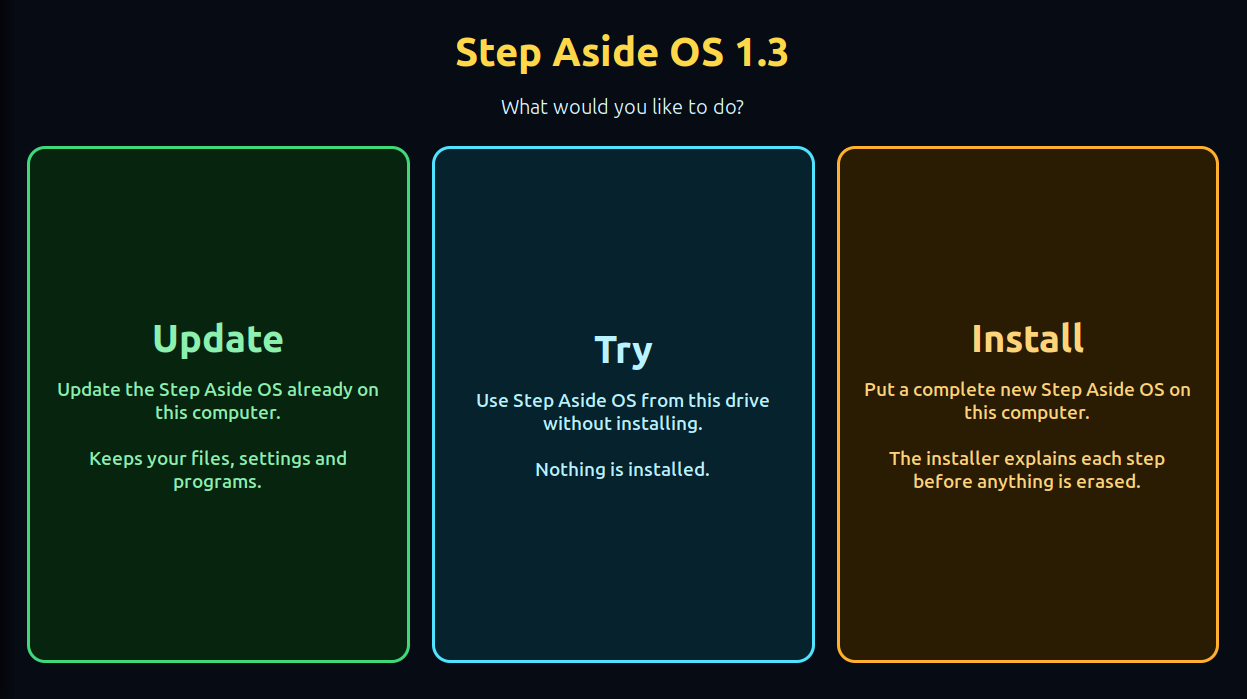
What is inside
Each tool is marked In 1.3 when it is in the current version, or Planned when it is not there yet.
Record sound from your computer or microphone, with noise clean-up.
An equalizer and volume boost for everything you play, one click from the top bar. Raise boost gradually: it can get loud.
Show processor temperature, processor load and memory use in the top bar when enabled.
Switch tools on and off and adjust browser settings from one place. Each tweak is explained before you apply it and can be switched back.
Open a Windows .exe or .msi file and Step Aside OS sets it up with Wine. Some Windows programs work and some do not.
A start page for your browser with your shortcuts and notes.
A guided way to copy files off a computer that will not start. It reads the old drive without changing it. Not every file on every drive can be recovered.
A dock you can rearrange and resize, a top bar that shows what you choose, and the version in view unless you hide it.
Three plain choices on the first screen. Supported updates keep your files, settings and programs.
Reads replies aloud in your browser.
Reads posts aloud in your browser.
Saves a video's captions as text you can keep.
Planned tools are not in version 1.3. They work with other companies' websites, need your own account where those sites require one, and do not include any subscription to those services.
Two ways to get it
Both editions are planned to include the same software bundle, with individual keys for the included proprietary tools and no extra unlock charges. The base system and safety tools remain available without activation.
$25 USD
Download Step Aside OS and make your own start-up USB drive.
$50 USD
The same software on a prepared USB thumb drive. The $50 price includes the thumb drive and shipping.
No payment is taken on this website yet. The $50 USB edition includes the thumb drive and shipping, with no separate shipping charge. Any applicable sales tax will be shown before you pay. The final tool list and terms will be published here before sales open.
How it works
Updates
New versions will be downloaded from this website. You will not need to buy another USB drive for an update. An update you have already downloaded is designed to install without an internet connection.
Supported updates keep your personal files, settings and installed programs. Keep a current backup before any system update.
We keep improving reliability and features. Release notes will say what has shipped. Future features and dates are not promised.
published with the downloadWhen a download opens it will appear here with its checksum, so you can confirm your copy is complete.
Before you buy
Step Aside OS is experimental software. Expect bugs, and expect that some computers and some programs will not work with it.
The planned keys will unlock proprietary Step Aside tools. How keys move to a reinstalled or replacement computer will be published before sales open.
Keys will never stop your computer starting, block your files, switch off Recovery or hold back security updates.
The open-source software inside, including Ubuntu, GNOME and Wine, keeps its own licences. Your rights under those licences stay exactly as they are.
Download edition
sha256sum stepaside-*.iso.Questions
Not yet. This page shows version 1.3 and the planned offer. Sales open when buying, delivery and keys all work from start to finish.
Yes. The $50 price includes the prepared thumb drive and shipping. There is no separate shipping charge. Any applicable sales tax will be shown before payment.
No. Both planned editions include individual keys for the included proprietary tools, with no extra unlock charges. The base system and safety tools remain available without activation.
Some will. Wine runs many Windows programs, but not all, and it depends on the exact program and version. Try yours with the Try choice before you install.
It is made for 64-bit PCs and builds on Ubuntu 26.04 LTS for hardware support. The safest check is to start from the drive and choose Try: Wi-Fi, sound and the screen can all be tested before anything is installed.
From this website. Supported updates keep your files, settings and installed programs, and release notes name the versions each update supports.
The planned key system will verify signed purchase entitlements for individual proprietary tools. It is not enforced in version 1.3. Keys cannot guarantee that software will never be shared or modified.
Support terms will be published here before sales open.